TeacherPalette app icon
The all-in-one presenter toolkit 발표자를 위한 올인원 툴킷 プレゼンター向けオールインワン 一体化演讲者工具包 La boîte à outils tout-en-un du présentateur Das All-in-One-Toolkit für Präsentierende El kit todo en uno para presentadores O kit tudo-em-um para apresentadores Il toolkit tutto-in-uno per presentatori

Draw, spotlight, whiteboard, timer, cursor — everything a live presenter needs, in one native macOS overlay. Built to run on top of Zoom, Meet, and Teams. 드로잉, 스포트라이트, 화이트보드, 타이머, 커서 — 발표자에게 필요한 모든 도구를 하나의 네이티브 macOS 오버레이 앱에. Zoom·Meet·Teams 위에서 그대로 작동합니다. 描画・スポットライト・ホワイトボード・タイマー・カーソル — プレゼンターに必要なすべてを、1 つのネイティブ macOS オーバーレイに。Zoom・Meet・Teams の上でそのまま動作。 绘图、聚光灯、白板、计时器、光标 — 现场演讲者所需的一切,尽在一个原生 macOS 悬浮层。可运行于 Zoom、Meet、Teams 之上。 Dessin, projecteur, tableau blanc, minuteur, curseur — tout ce dont un présentateur a besoin, dans une seule superposition native macOS. Conçu pour fonctionner par-dessus Zoom, Meet et Teams. Zeichnen, Spotlight, Whiteboard, Timer, Cursor — alles, was ein Live-Präsentierender braucht, in einem einzigen nativen macOS-Overlay. Läuft über Zoom, Meet und Teams. Dibujo, foco, pizarra, temporizador, cursor — todo lo que un presentador en vivo necesita, en una única superposición nativa de macOS. Diseñado para funcionar sobre Zoom, Meet y Teams. Desenho, holofote, quadro, timer, cursor — tudo que um apresentador ao vivo precisa, em uma única sobreposição nativa do macOS. Feito para rodar sobre Zoom, Meet e Teams. Disegno, riflettore, lavagna, timer, cursore — tutto ciò che serve a un presentatore live, in un'unica sovrapposizione nativa per macOS. Progettato per funzionare sopra Zoom, Meet e Teams.

Download for macOS macOS용 다운로드 macOS 版をダウンロード 下载 macOS 版 Télécharger pour macOS Für macOS herunterladen Descargar para macOS Baixar para macOS Scarica per macOS See features 기능 살펴보기 機能を見る 查看功能 Voir les fonctionnalités Funktionen ansehen Ver funciones Ver recursos Vedi le funzioni
New in 1.1.7 — ⌘K Command Palette · Whiteboard templates & Chalkboard mode · Reusable Session History 1.1.7 신규 — ⌘K 커맨드 팔레트 · 화이트보드 템플릿·칠판 모드 · 다시 꺼내 쓰는 세션 히스토리 1.1.7 新機能 — ⌘K コマンドパレット · ホワイトボードテンプレート・黒板モード · 再利用できるセッション履歴 1.1.7 新增 — ⌘K 命令面板 · 白板模板与黑板模式 · 可重复使用的会话历史 Nouveau dans 1.1.7 — Palette de commandes ⌘K · Modèles de tableau blanc et mode tableau noir · Historique de sessions réutilisable Neu in 1.1.7 — ⌘K Befehlspalette · Whiteboard-Vorlagen & Tafelmodus · Wiederverwendbarer Sitzungsverlauf Nuevo en 1.1.7 — Paleta de comandos ⌘K · Plantillas de pizarra y modo pizarra negra · Historial de sesiones reutilizable Novo na 1.1.7 — Paleta de comandos ⌘K · Modelos de quadro e modo quadro-negro · Histórico de sessões reutilizável Novità in 1.1.7 — Tavolozza dei comandi ⌘K · Modelli lavagna e modalità lavagna nera · Cronologia sessioni riutilizzabile
Live lecture실시간 강의ライブ講義 实时讲课Cours en directLive-Vorlesung Clase en vivoAula ao vivoLezione dal vivo

Q3 Product Roadmap3분기 제품 로드맵Q3 プロダクトロードマップ Q3 产品路线图Feuille de route Q3Q3 Produkt-Roadmap Hoja de ruta Q3Roadmap Q3Roadmap del Q3

  • Ship v2.0 API to productionv2.0 API 프로덕션 배포v2.0 API 本番リリース 发布 v2.0 API 到生产环境Livrer l'API v2.0 en productionv2.0 API in Produktion bringen Lanzar API v2.0 a producciónLançar API v2.0 em produçãoRilasciare API v2.0 in produzione
  • Migrate legacy database레거시 DB 마이그레이션レガシー DB 移行 迁移遗留数据库Migrer la base héritéeLegacy-DB migrieren Migrar la base heredadaMigrar banco de dados legadoMigrare il database legacy
  • Onboard 5 new enterprise customers기업 고객 5곳 온보딩新規エンタープライズ顧客 5 社 接入 5 家新企业客户Intégrer 5 nouveaux clients5 neue Enterprise-Kunden onboarden Incorporar 5 clientes empresarialesIntegrar 5 novos clientesOnboarding di 5 nuovi clienti

One app. Every tool you need. 앱 하나에, 필요한 모든 도구. アプリひとつに、必要な機能すべて。 一款应用,涵盖所需一切。 Une seule app. Tous les outils nécessaires. Eine App. Alle Werkzeuge, die du brauchst. Una app. Todas las herramientas que necesitas. Um app. Todas as ferramentas que você precisa. Un'unica app. Tutti gli strumenti che ti servono.

Drawing, whiteboard, spotlight, laser, custom cursor, palette, timer — one download replaces a whole toolbox of single-purpose apps. Loaded with features, yet every one stays simple enough to actually use — no buried settings, no learning curve. 드로잉, 화이트보드, 스포트라이트, 레이저, 커스텀 커서, 팔레트, 타이머까지 — 한 번의 설치로 여러 개의 개별 앱을 대체합니다. 기능은 많지만 설정은 늘 단순해서 진짜로 다 쓰게 돼요 — 파묻힌 설정도, 학습 곡선도 없어요. 描画、ホワイトボード、スポットライト、レーザー、カスタムカーソル、パレット、タイマー — 個別アプリの寄せ集めを、1 つのダウンロードでまとめて置き換え。機能は豊富でも、どれも実際に使えるくらいシンプルなまま — 埋もれた設定も、学習コストもありません。 绘图、白板、聚光灯、激光笔、自定义光标、调色板、计时器 — 一次下载替代一整套单一功能应用。功能丰富,却始终简单到真正会去用 —— 没有藏得很深的设置,也没有学习门槛。 Dessin, tableau blanc, projecteur, laser, curseur personnalisé, palette, minuteur — un seul téléchargement remplace toute une boîte à outils d'apps à usage unique. Riche en fonctionnalités, mais chacune reste assez simple pour être vraiment utilisée — pas de réglages enfouis, pas de courbe d'apprentissage. Zeichnen, Whiteboard, Spotlight, Laser, eigener Cursor, Palette, Timer — ein einziger Download ersetzt eine ganze Werkzeugkiste von Einzelzweck-Apps. Vollgepackt mit Funktionen, doch jede davon bleibt so einfach, dass man sie wirklich nutzt — keine verschachtelten Einstellungen, keine Lernkurve. Dibujo, pizarra, foco, láser, cursor personalizado, paleta, temporizador — una sola descarga reemplaza toda una caja de herramientas de apps de un solo propósito. Repleto de funciones, pero cada una sigue siendo lo bastante sencilla para usarla de verdad — sin ajustes escondidos, sin curva de aprendizaje. Desenho, quadro branco, holofote, laser, cursor personalizado, paleta, timer — um único download substitui uma caixa inteira de apps de propósito único. Repleto de recursos, mas cada um continua simples o bastante para você realmente usar — sem ajustes escondidos, sem curva de aprendizado. Disegno, lavagna, riflettore, laser, cursore personalizzato, palette, timer — un unico download sostituisce un'intera cassetta di app monoscopo. Pieno di funzionalità, eppure ognuna resta abbastanza semplice da usare davvero — nessuna impostazione nascosta, nessuna curva di apprendimento.

Drawing tools드로잉 도구描画ツール 绘图工具Outils de dessinZeichenwerkzeuge Herramientas de dibujoFerramentas de desenhoStrumenti di disegno

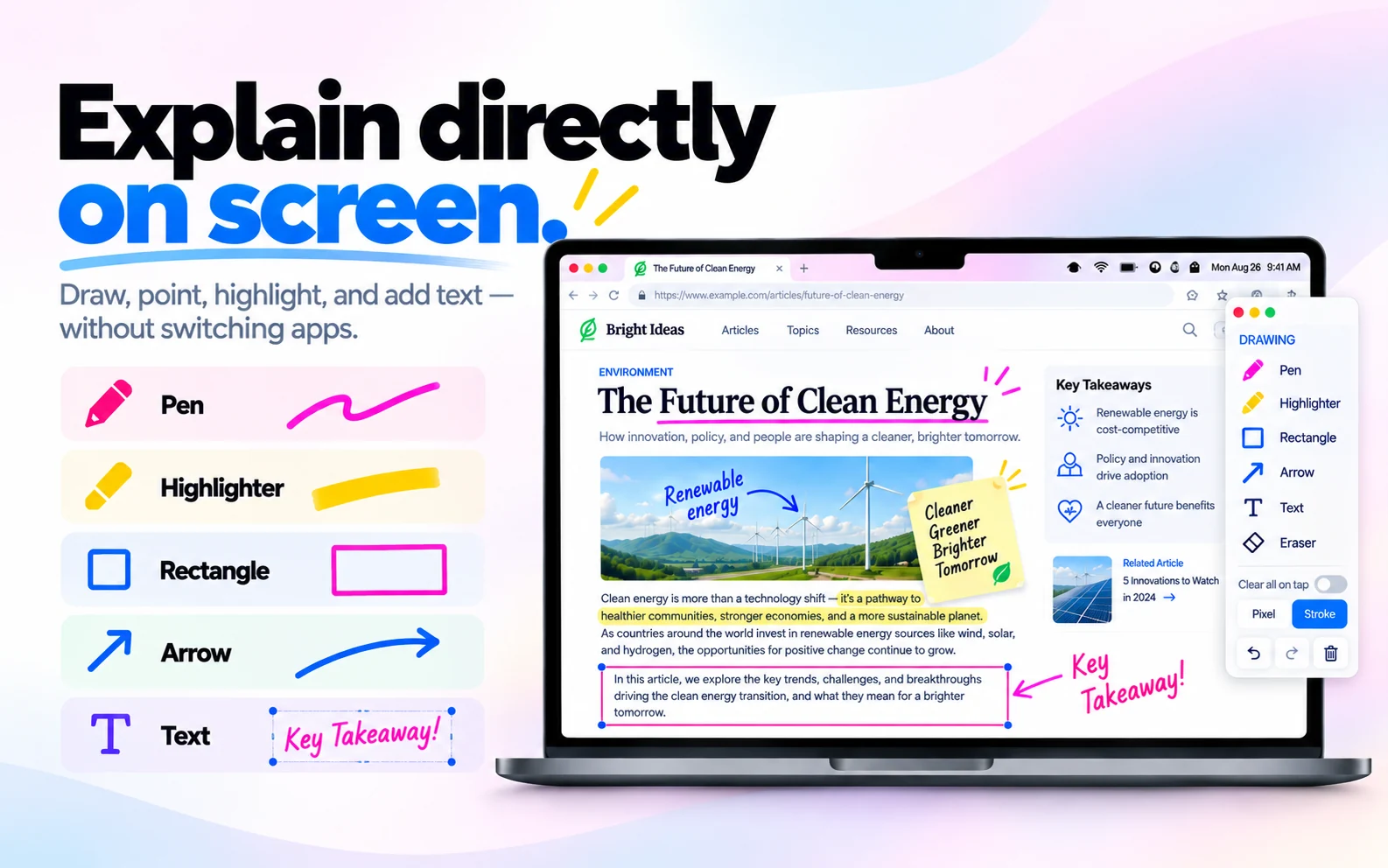
Pen, highlighter, arrow, rectangle, text, and pixel/stroke eraser. Auto-clear on release. 펜, 형광펜, 화살표, 사각형, 텍스트, 픽셀/획 지우개. 손 뗄 때 자동 삭제 옵션. ペン・マーカー・矢印・四角形・テキスト・ピクセル/ストローク消しゴム。ペンを離すと自動消去可能。 画笔、荧光笔、箭头、矩形、文本和像素/笔画橡皮。抬手自动清除可选。 Stylo, surligneur, flèche, rectangle, texte et gomme pixel/trait. Effacement auto au relâchement. Stift, Marker, Pfeil, Rechteck, Text und Pixel/Strich-Radierer. Auto-Löschen beim Loslassen. Bolígrafo, marcador, flecha, rectángulo, texto y borrador de píxel/trazo. Borrado automático al soltar. Caneta, marca-texto, seta, retângulo, texto e borracha de pixel/traço. Limpeza automática ao soltar. Penna, evidenziatore, freccia, rettangolo, testo e gomma pixel/tratto. Auto-cancellazione al rilascio.

Whiteboard mode화이트보드 모드ホワイトボードモード 白板模式Mode tableau blancWhiteboard-Modus Modo pizarraModo quadro brancoModalità lavagna

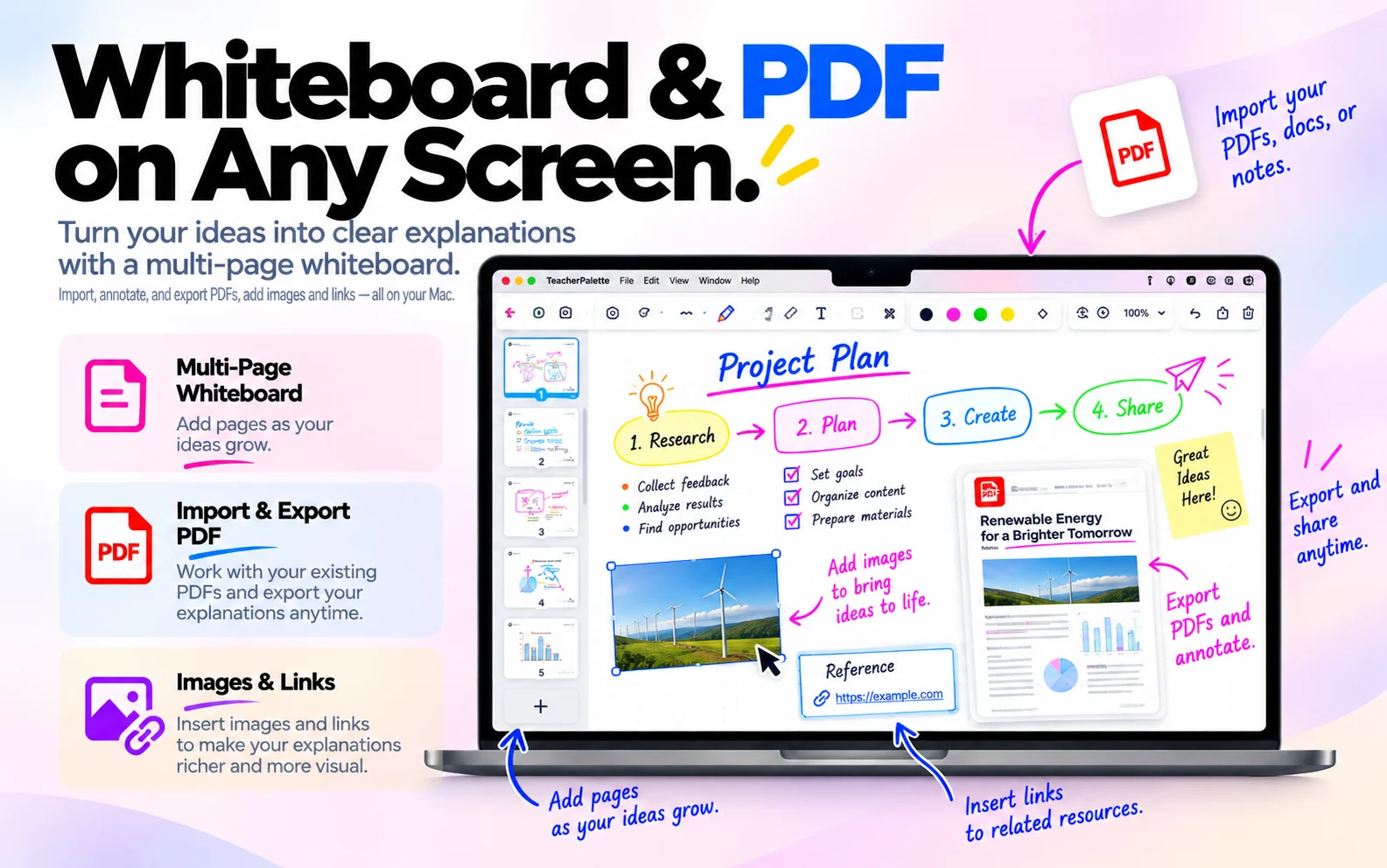
Multi-page whiteboard with instant page switching, drag & drop images, and one-click PDF export. 여러 페이지를 즉시 전환, 이미지 드래그 앤 드롭, 원클릭 PDF 저장까지. 複数ページ即時切替、画像ドラッグ&ドロップ、ワンクリック PDF 保存。 多页白板,即时切换、拖放图片、一键导出 PDF。 Tableau multi-pages avec changement instantané, glisser-déposer d'images et export PDF en un clic. Mehrseitiges Whiteboard mit sofortigem Seitenwechsel, Drag & Drop von Bildern und PDF-Export mit einem Klick. Pizarra de varias páginas con cambio instantáneo, arrastrar y soltar imágenes y exportación PDF con un clic. Quadro branco de várias páginas, troca instantânea, arrastar e soltar imagens e exportação PDF com um clique. Lavagna multi-pagina con cambio istantaneo, drag & drop di immagini ed export PDF con un clic.

Spotlight & laser스포트라이트 & 레이저スポットライト & レーザー 聚光灯与激光笔Projecteur & laserSpotlight & Laser Foco y láserHolofote & laserRiflettore & laser

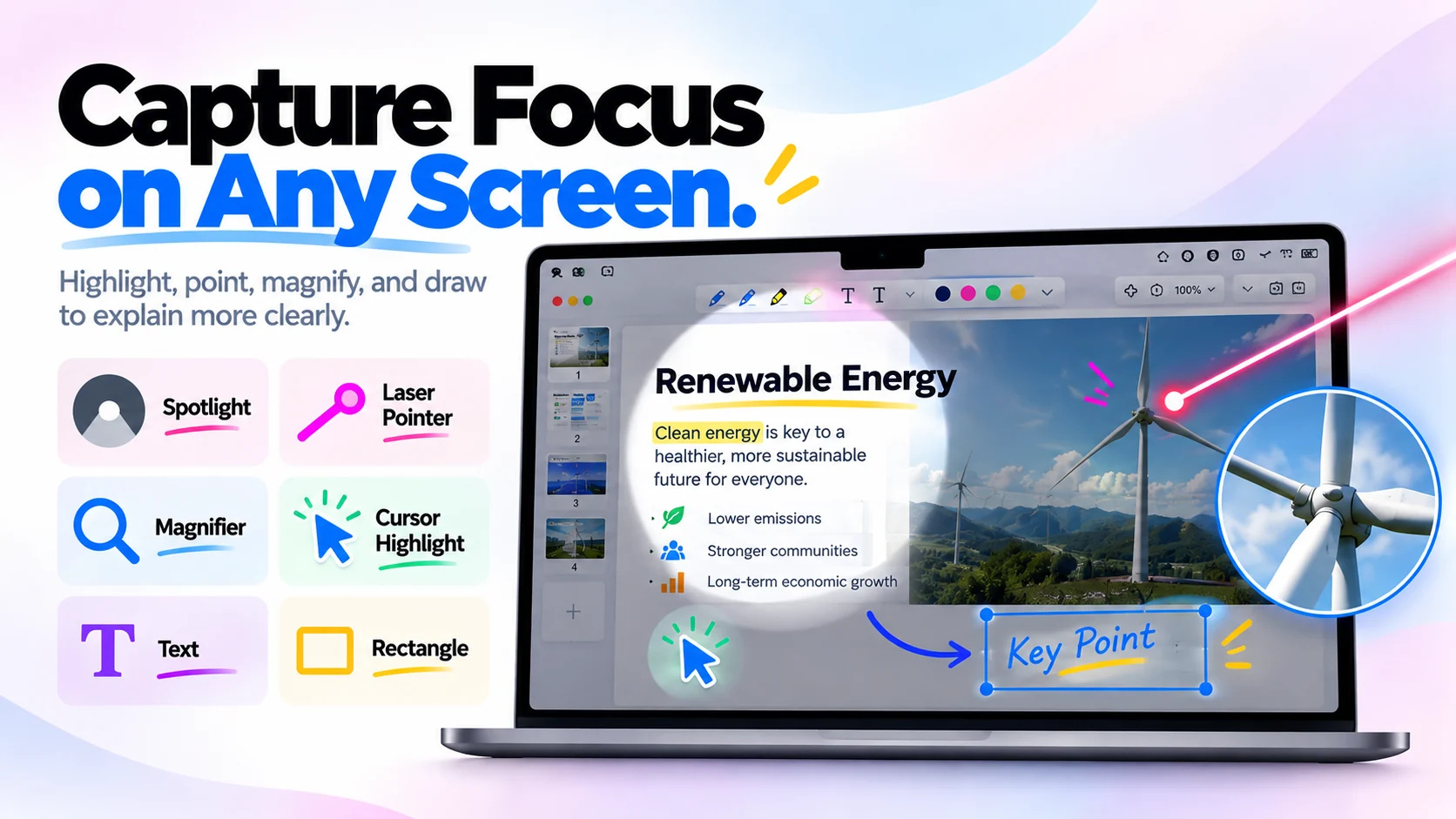
Dim everything except a bright circle around your cursor. Trailing laser pointer for pointing without clicking. 커서 주변만 밝게, 나머지는 어둡게. 클릭 없이 시선을 유도하는 레이저 포인터. カーソル周りだけ明るく、他は暗く。クリックなしで視線を誘導するレーザーポインター。 除光标周围的高亮圆外,其他区域全部变暗。带轨迹的激光笔,无需点击即可指引视线。 Assombrit tout sauf un cercle lumineux autour de votre curseur. Pointeur laser avec traînée pour désigner sans cliquer. Dunkelt alles außer einem hellen Kreis um deinen Cursor ab. Laserpointer mit Nachlauf zum Zeigen ohne Klicken. Oscurece todo excepto un círculo brillante alrededor del cursor. Puntero láser con estela para señalar sin hacer clic. Escurece tudo, exceto um círculo brilhante ao redor do cursor. Ponteiro laser com rastro para apontar sem clicar. Oscura tutto tranne un cerchio luminoso attorno al cursore. Puntatore laser con scia per indicare senza cliccare.

Multi-display멀티 디스플레이マルチディスプレイ 多显示器Multi-écransMulti-Display Multi-pantallaMulti-telaMulti-schermo

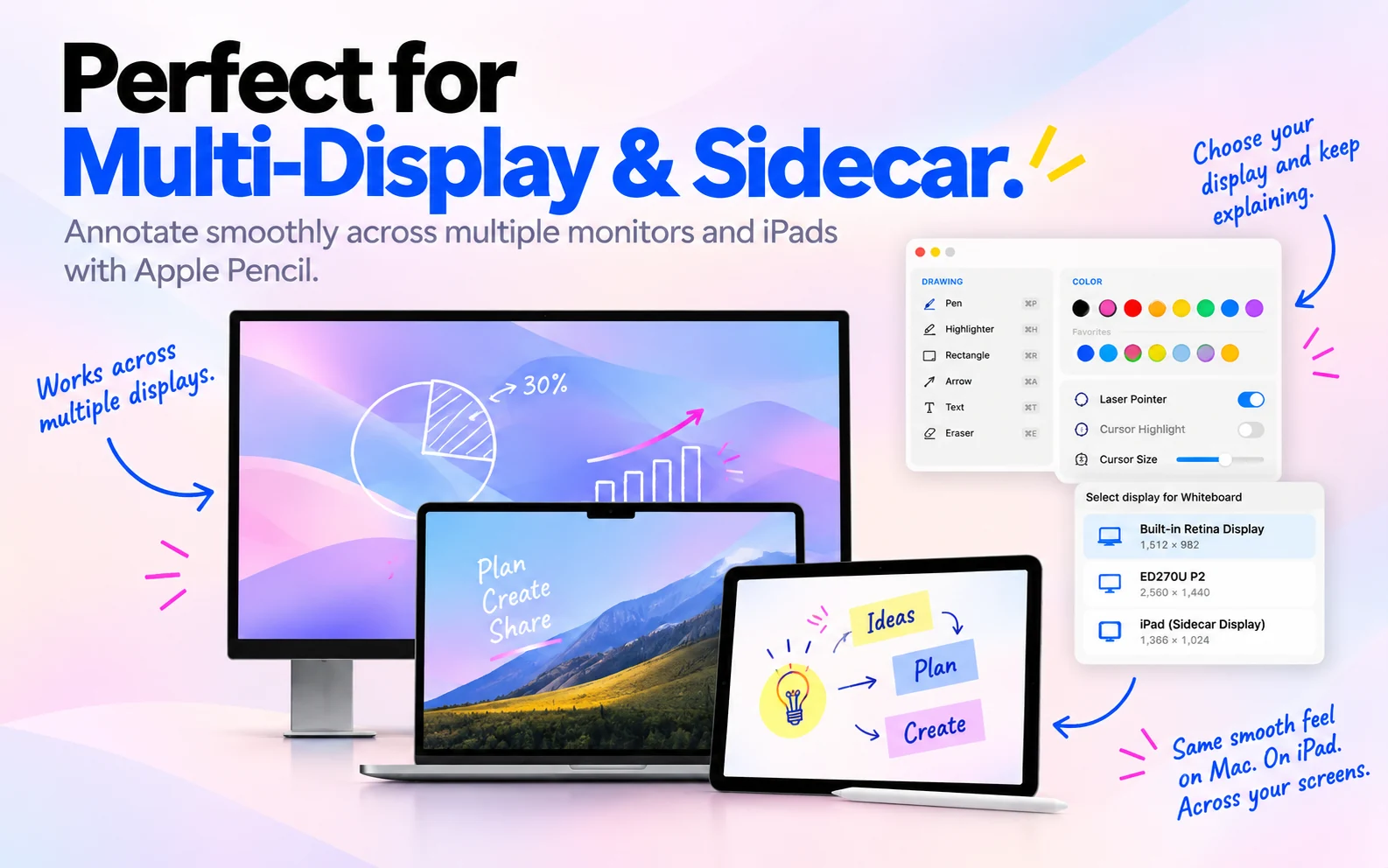
Full support for multiple monitors and iPad Sidecar. Choose which screen to annotate, whiteboard, or BRB. 여러 모니터와 iPad Sidecar 완벽 지원. 어느 화면에서 그릴지, 화이트보드 띄울지 선택. 複数モニターと iPad Sidecar に完全対応。描画・ホワイトボード・BRB を任意の画面で。 完整支持多显示器和 iPad Sidecar。可选择在哪个屏幕上批注、开白板或显示暂离页。 Prise en charge complète de plusieurs écrans et iPad Sidecar. Choisissez sur quel écran annoter, ouvrir le tableau ou afficher la pause. Volle Unterstützung für mehrere Monitore und iPad Sidecar. Wähle, auf welchem Bildschirm annotiert, Whiteboard oder Pause angezeigt wird. Compatibilidad completa con varios monitores e iPad Sidecar. Elige en qué pantalla anotar, abrir la pizarra o mostrar la pausa. Suporte total para vários monitores e iPad Sidecar. Escolha em qual tela anotar, abrir o quadro ou mostrar pausa. Supporto completo per più monitor e iPad Sidecar. Scegli su quale schermo annotare, aprire lavagna o pausa.

Shortcuts that flow with you흐름을 끊지 않는 단축키流れを止めないショートカット 不打断心流的快捷键Raccourcis dans le fluxShortcuts, die mitfließen Atajos que fluyen contigoAtalhos que fluem com vocêScorciatoie che scorrono con te

Two-tier hybrid: tools & effects use ⌥ + letter (2-key), system actions keep ⌘⇧ + letter (3-key, accident-proof). Plus single keys while drawing — clears, [ ] resize, 1–5 pick favorite color. Fully remappable. Works from Zoom, Slides, Keynote, Chrome. 두 단계 하이브리드: 도구·이펙트는 ⌥ + 알파벳 (2-키), 시스템은 ⌘⇧ + 알파벳 (3-키, 실수 방지). 드로잉 중엔 1-키까지 — 전체 삭제, [ ] 굵기 조절, 1~5 즐겨찾기 색상. 모두 재정의 가능. Zoom·Slides·Keynote·Chrome에서 그대로 작동. 2階層ハイブリッド: ツール・エフェクトは ⌥ + アルファベット (2キー)、システムは ⌘⇧ + アルファベット (3キー、誤操作防止)。描画中は1キーも — 全消去、[ ] サイズ調整、1〜5 お気に入り色。すべて再割当可能。Zoom・Slides・Keynote・Chrome で動作。 双层混合快捷键:工具与特效使用 ⌥ + 字母 (2 键),系统操作保留 ⌘⇧ + 字母 (3 键,防误触)。绘图时还有单键 — 清空、[ ] 调整大小、1–5 收藏颜色。全部可重映射。Zoom、Slides、Keynote、Chrome 中通用。 Hybride à deux niveaux : outils & effets en ⌥ + lettre (2 touches), actions système en ⌘⇧ + lettre (3 touches). En dessin, touches uniques — tout effacer, [ ] taille, 1–5 couleur favorite. Entièrement réassignable. Fonctionne depuis Zoom, Slides, Keynote, Chrome. Zweistufig hybrid: Werkzeuge & Effekte mit ⌥ + Buchstabe (2 Tasten), System mit ⌘⇧ + Buchstabe (3 Tasten). Beim Zeichnen auch Einzeltasten — Alles löschen, [ ] Größe, 1–5 Lieblingsfarbe. Vollständig neu zuweisbar. Funktioniert aus Zoom, Slides, Keynote, Chrome. Híbrido de dos niveles: herramientas y efectos con ⌥ + letra (2 teclas), sistema con ⌘⇧ + letra (3 teclas). Al dibujar, teclas únicas — borrar todo, [ ] tamaño, 1–5 color favorito. Reasignable. Funciona desde Zoom, Slides, Keynote, Chrome. Híbrido de dois níveis: ferramentas & efeitos com ⌥ + letra (2 teclas), sistema com ⌘⇧ + letra (3 teclas). Ao desenhar, teclas únicas — limpar tudo, [ ] tamanho, 1–5 cor favorita. Remapeável. Funciona no Zoom, Slides, Keynote, Chrome. Ibrido a due livelli: strumenti & effetti con ⌥ + lettera (2 tasti), sistema con ⌘⇧ + lettera (3 tasti). Durante il disegno, tasti singoli — cancella tutto, [ ] dimensione, 1–5 colore preferito. Riassegnabile. Funziona da Zoom, Slides, Keynote, Chrome.

BRB timerBRB 타이머BRB タイマー 暂离计时器Minuteur de pausePause-Timer Temporizador de pausaTimer de intervaloTimer di pausa

Full-screen "Be Right Back" overlay with a countdown for breaks. Students see when you'll return. 휴식 시간을 알리는 전체화면 "잠시 후 돌아오겠습니다" 오버레이 + 카운트다운. 休憩を伝える全画面「戻ってきます」オーバーレイ + カウントダウン。 全屏"马上回来"叠加层,带倒计时。让学生看到您何时回来。 Superposition plein écran « Je reviens » avec compte à rebours. Les étudiants voient quand vous revenez. Vollbild-„Bin gleich zurück"-Overlay mit Countdown. Studenten sehen, wann du zurückkommst. Superposición a pantalla completa «Vuelvo enseguida» con cuenta atrás. Los estudiantes ven cuándo regresas. Sobreposição em tela cheia "Volto já" com contagem regressiva. Alunos veem quando você retorna. Sovrapposizione a schermo intero "Torno subito" con conto alla rovescia. Gli studenti vedono quando torni.

My Palette마이 팔레트マイパレット 我的调色板Ma paletteMeine Palette Mi paletaMinha paletaLa mia palette

Only the tools you actually use, minimized out of the way. 정말 쓰는 도구만, 발표 화면을 방해하지 않게 최소화. 本当に使う道具だけ、プレゼン画面を邪魔せず最小化。

Pick the colors and tools you want and hide the rest. The palette collapses to a tiny badge so nothing distracts your audience. 필요한 색상과 도구만 골라 담고 나머지는 감추세요. 팔레트는 작은 배지로 접혀서 청중의 시선을 방해하지 않습니다. 必要な色と道具だけを選び、残りは非表示に。パレットは小さなバッジに折りたたまれ、視聴者の視線を邪魔しません。

  • Curate favorite colors and custom slots per session 세션마다 즐겨찾기 색상 + 커스텀 슬롯 큐레이션 セッションごとにお気に入りとカスタムスロットを整理
  • Collapse to a small badge — one click to summon full toolbar 작은 배지로 접기 — 클릭 한 번에 풀 툴바 복귀 小さなバッジに折りたたみ — クリックで元のツールバーに復元
  • Even when minimized, every shortcut fires globally — from any app, any screen 완전히 최소화된 상태에서도, 단축키는 어느 앱·어느 화면에서든 작동 完全に最小化された状態でも、ショートカットはどのアプリ・どの画面からでも起動
Drawing mode드로잉 모드描画モード 绘图模式Mode dessinZeichenmodus Modo dibujoModo desenhoModalità disegno

You'll always know when drawing is live. 드로잉 상태를 놓칠 일이 없습니다. 描画中かどうかを見逃しません。

The moment you enable drawing mode, a soft paint-blob halo blooms into every screen edge and a HUD confirms the state. No more accidental clicks, no more guessing which display is active. 드로잉 모드를 켜는 순간, 모든 화면 가장자리에 물감 블롭이 은은하게 번지고 HUD가 상태를 확인해줍니다. 실수로 클릭할 일도, 어느 화면이 활성인지 헷갈릴 일도 없습니다. 描画モードを有効にした瞬間、すべての画面の縁に絵の具ブロブがふわりと広がり、HUD が状態を教えてくれます。誤クリックも、どの画面が有効か迷うこともありません。

  • Paint-blob halo animates in around every connected display 연결된 모든 디스플레이 가장자리에 물감 블롭 애니메이션 接続されたすべてのディスプレイの縁で絵の具ブロブがアニメーション
  • HUD badge confirms Drawing ON — visible only to you, never to the audience Drawing ON HUD 배지로 확인 — 발표자에게만 보이고 청중에게는 보이지 않음 Drawing ON の HUD バッジで確認 — 発表者にのみ表示、参加者には非表示
  • Turn off with the same shortcut — halo fades away instantly 같은 단축키로 끄기 — 블롭이 즉시 사라집니다 同じショートカットでオフ — ブロブが即座に消えます
Command Palette커맨드 팔레트コマンドパレット 命令面板Palette de commandesBefehlspalette Paleta de comandosPaleta de comandosTavolozza dei comandi

Forget the shortcuts. Just search for what you need. 단축키를 몰라도, 검색 한 번이면 끝. ショートカットを覚えなくても、検索するだけ。 记不住快捷键?搜索一下就好。 Oubliez les raccourcis. Cherchez ce qu'il vous faut. Shortcuts vergessen? Einfach suchen. Olvida los atajos. Solo busca lo que necesitas. Esqueça os atalhos. Basta buscar o que precisa. Scorciatoie? Basta cercare quello che ti serve.

Press ⌘K anywhere in the app and a search bar appears — type a few letters and every tool, effect, and setting shows up instantly, ready to launch with one click or the arrow keys. 앱 어디서든 ⌘K를 누르면 검색창이 뜹니다. 몇 글자만 입력해도 모든 도구·이펙트·설정이 바로 나타나고, 클릭이나 방향키로 즉시 실행할 수 있어요. アプリのどこからでも ⌘K を押すと検索バーが表示されます。数文字入力するだけで、すべてのツール・エフェクト・設定が即座に表示され、クリックや矢印キーで実行できます。 在应用的任何位置按下 ⌘K,搜索框就会出现。只需输入几个字母,所有工具、特效和设置都会立即显示,点击或用方向键即可启动。 Appuyez sur ⌘K n'importe où dans l'app pour afficher une barre de recherche — tapez quelques lettres et tous les outils, effets et réglages apparaissent instantanément, prêts à lancer d'un clic ou avec les flèches. Drücke ⌘K an jeder Stelle in der App, und eine Suchleiste erscheint — tippe ein paar Buchstaben, und jedes Werkzeug, jeder Effekt und jede Einstellung wird sofort angezeigt, startklar per Klick oder Pfeiltasten. Pulsa ⌘K en cualquier parte de la app y aparece una barra de búsqueda — escribe unas letras y todas las herramientas, efectos y ajustes aparecen al instante, listos para iniciar con un clic o las flechas. Pressione ⌘K em qualquer lugar do app e uma barra de busca aparece — digite algumas letras e todas as ferramentas, efeitos e configurações aparecem instantaneamente, prontos para iniciar com um clique ou as setas. Premi ⌘K in qualsiasi punto dell'app e appare una barra di ricerca — digita qualche lettera e ogni strumento, effetto e impostazione appare all'istante, pronto da avviare con un clic o le freccette.

  • Type a few letters — fuzzy search finds the right tool instantly 몇 글자만 입력해도 원하는 도구를 즉시 찾아줍니다 数文字入力するだけで、目的のツールを即座に検索 只需输入几个字母 — 模糊搜索立即找到对应工具 Tapez quelques lettres — la recherche floue trouve l'outil en un instant Tippe ein paar Buchstaben — die Fuzzy-Suche findet sofort das richtige Werkzeug Escribe unas letras — la búsqueda difusa encuentra la herramienta al instante Digite algumas letras — a busca aproximada encontra a ferramenta na hora Digita qualche lettera — la ricerca fuzzy trova subito lo strumento giusto
  • Every tool, effect, and setting lives in one searchable list — no menus to dig through 모든 도구·이펙트·설정이 검색 가능한 하나의 목록에 — 메뉴를 뒤질 필요 없음 すべてのツール・エフェクト・設定が検索可能な一つのリストに — メニューを掘る必要なし 所有工具、特效和设置都在一个可搜索的列表中 — 无需翻找菜单 Tous les outils, effets et réglages dans une seule liste consultable — plus besoin de fouiller les menus Jedes Werkzeug, jeder Effekt und jede Einstellung in einer durchsuchbaren Liste — kein Wühlen in Menüs mehr Todas las herramientas, efectos y ajustes en una sola lista buscable — sin rebuscar en menús Todas as ferramentas, efeitos e configurações em uma única lista pesquisável — sem precisar vasculhar menus Ogni strumento, effetto e impostazione in un'unica lista ricercabile — niente menu da scavare
  • Navigate with arrow keys or click — launch in one action 방향키 또는 클릭으로 이동 — 한 번의 동작으로 실행 矢印キーまたはクリックで移動 — ワンアクションで実行 用方向键或点击浏览 — 一步即可启动 Naviguez avec les flèches ou la souris — lancez en un seul geste Navigiere mit den Pfeiltasten oder per Klick — starte mit einer einzigen Aktion Navega con las flechas o con un clic — inicia con una sola acción Navegue com as setas ou clique — inicie com uma única ação Naviga con le freccette o un clic — avvia con un'unica azione
One-hand cycling원핸드 순환片手サイクル 单手循环Cycle à une mainEinhand-Wechsel Cambio con una manoCiclo com uma mãoCiclo a una mano

Change tools and colors without lifting a finger from the trackpad. 트랙패드에서 손을 떼지 않고 도구와 색상을 전환. トラックパッドから手を離さずに、道具と色を切り替え。

Hold Command or Option, scroll — watch the tool and color glide past a HUD in the corner. Keep your rhythm, keep your flow. Command 또는 Option을 누른 채 스크롤하면 도구와 색상이 화면 구석의 HUD로 부드럽게 지나갑니다. 리듬을 끊지 않고 발표에 집중. Command または Option を押しながらスクロール。ツールと色が画面隅の HUD をなめらかに流れます。リズムを崩さず、発表に集中。

  • ⌘ + Scroll — cycle drawing tools (pen, highlighter, arrow, eraser…) ⌘ + 스크롤 — 드로잉 도구 순환 (펜, 형광펜, 화살표, 지우개…) ⌘ + スクロール — 描画ツールをサイクル (ペン、マーカー、矢印、消しゴム…)
  • ⌥ + Scroll — cycle through your favorite palette colors ⌥ + 스크롤 — 즐겨찾기 팔레트 색상 순환 ⌥ + スクロール — お気に入りパレットの色をサイクル
  • Corner HUD confirms the change without stealing focus 구석 HUD가 변경을 즉시 확인 — 집중은 발표 화면 그대로 コーナー HUD が変更を即座に確認 — 集中はプレゼン画面のまま
Custom Cursor나만의 커서マイカーソル 自定义光标Curseur personnaliséEigener Cursor Cursor personalizadoCursor personalizadoCursore personalizzato

Ditch the arrow. Point with anything. 화살표는 그만. 뭐든지 커서로 삼으세요. 矢印はもう終わり。何でもカーソルに。

Drop in any image — a paw print, a laser dot, your brand mascot — and it becomes your cursor. Save multiple presets and swap on the fly. 어떤 이미지든 넣으면 커서가 됩니다 — 발자국, 레이저 점, 브랜드 마스코트. 여러 프리셋을 저장해 즉시 전환하세요. どんな画像でもドロップすれば、それがカーソルに — 足跡、レーザードット、ブランドマスコット。複数のプリセットを保存し、即時切替。

  • Save up to 6 cursor images as presets 최대 6개의 커서 이미지를 프리셋으로 저장 最大 6 個のカーソル画像 をプリセットとして保存
  • Pair with laser, click highlight, or cursor highlight — layer effects for fresh, purposeful ways to guide attention 레이저·클릭 강조·커서 강조 효과와 병행 사용 — 여러 효과를 겹쳐 신선하고 목적 있는 시선 유도 レーザー・クリック強調・カーソルハイライトと組み合わせて — 効果を重ねて新鮮で目的のある視線誘導
Live HUD실시간 HUDライブ HUD 实时 HUDHUD en directLive-HUD HUD en vivoHUD ao vivoHUD in tempo reale

Every change confirmed on screen — no need to look at the toolbar. 변경할 때마다 화면으로 확인 — 툴바를 볼 필요 없어요. 変更するたびに画面で確認 — ツールバーを見る必要なし。

Switch a tool, cycle a color, toggle any mode — a floating HUD badge quietly appears with the icon, name, and even the actual color swatch, then fades. Confirmation without distraction. 도구 변경, 색상 순환, 모드 토글 — 그때마다 화면에 HUD 배지가 잠깐 떠서 아이콘·이름·실제 색상 스와치까지 보여주고 스르륵 사라집니다. 방해 없이 확인. ツール切替、色サイクル、モード切替 — そのたびに HUD バッジが浮かび、アイコン・名前・実際のカラースウォッチまで表示してすっと消えます。邪魔せず確認。

  • Tool changes show the icon + name of the new tool 도구 변경 시 새 도구의 아이콘 + 이름 표시 ツール切替時、新しいツールのアイコン + 名前を表示
  • Color cycling reveals the actual swatch color 색상 순환 시 실제 색상 스와치를 그대로 표시 色サイクル時、実際のカラースウォッチをそのまま表示
  • Never visible in screen-shared content — hidden from Zoom capture 화면 공유 중에는 참가자에게 보이지 않음 — Zoom 캡처에서 숨김 画面共有中は参加者に見えません — Zoom キャプチャから除外
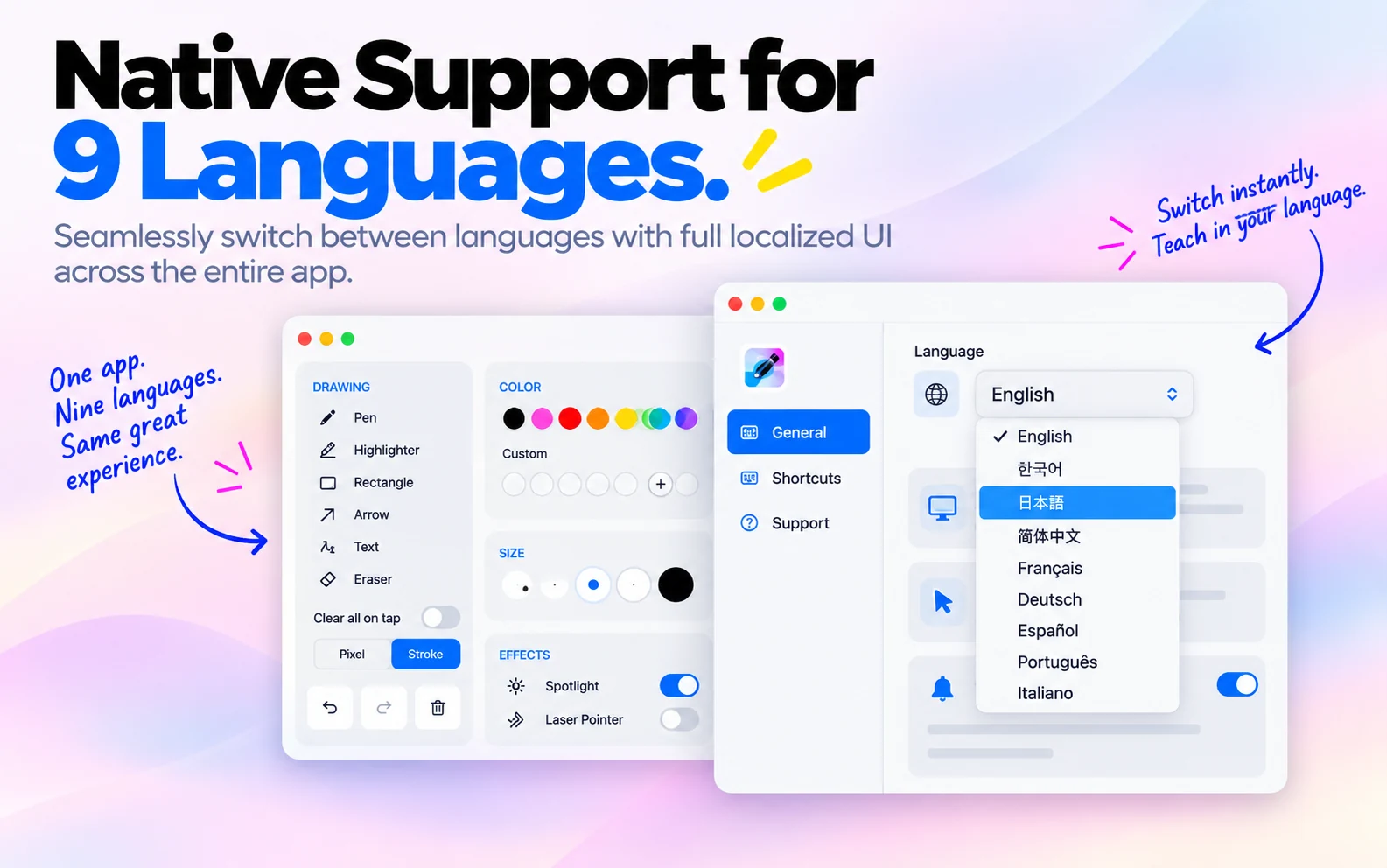
9 languages9개 언어9 言語 9 种语言9 langues9 Sprachen 9 idiomas9 idiomas9 lingue

Present in your own language — instantly. 당신의 언어로, 즉시 시작하세요. あなたの言語で、すぐに始められます。 用您自己的语言 — 立即开始。 Présentez dans votre propre langue — instantanément. Präsentiere in deiner eigenen Sprache — sofort. Presenta en tu propio idioma — al instante. Apresente no seu próprio idioma — instantaneamente. Presenta nella tua lingua — subito.

TeacherPalette speaks 9 languages out of the box. On first launch we auto-detect your system language — you can also switch anytime from Settings. TeacherPalette는 9개 언어를 기본 지원합니다. 첫 실행 시 시스템 언어를 자동 감지하며, 언제든 설정에서 변경할 수 있습니다. TeacherPalette は 9 言語をネイティブサポート。初回起動時にシステム言語を自動検出、いつでも設定から変更できます。 TeacherPalette 原生支持 9 种语言。首次启动时自动检测系统语言,您也可随时在设置中切换。 TeacherPalette prend en charge 9 langues nativement. Détection automatique de la langue système au premier lancement, changement possible à tout moment dans les Paramètres. TeacherPalette unterstützt 9 Sprachen von Haus aus. Beim ersten Start wird deine Systemsprache automatisch erkannt — jederzeit über Einstellungen wechselbar. TeacherPalette soporta 9 idiomas de forma nativa. En el primer inicio detecta automáticamente tu idioma — puedes cambiarlo en Ajustes cuando quieras. TeacherPalette suporta 9 idiomas nativamente. Na primeira execução detecta automaticamente o idioma do sistema — troque quando quiser nas Preferências. TeacherPalette supporta 9 lingue nativamente. Al primo avvio rileva automaticamente la lingua di sistema — cambiabile in qualsiasi momento dalle Impostazioni.

  • 9 languages built in — no plugins or add-ons 9개 언어 기본 내장 — 플러그인 불필요 9 言語をネイティブ搭載 — プラグイン不要 9 种语言原生内置 — 无需插件 9 langues intégrées — aucun plugin nécessaire 9 Sprachen integriert — keine Plugins nötig 9 idiomas incorporados — sin plugins 9 idiomas nativos — sem plugins 9 lingue integrate — nessun plugin
  • Auto-detected on first launch based on your macOS system language 첫 실행 시 macOS 시스템 언어에 맞춰 자동 감지 初回起動時に macOS システム言語から自動検出 首次启动时根据 macOS 系统语言自动检测 Détection automatique au premier lancement selon la langue macOS Automatische Erkennung beim ersten Start basierend auf macOS-Systemsprache Detección automática al iniciar según el idioma de macOS Detecção automática no primeiro uso baseada no idioma do macOS Rilevamento automatico al primo avvio in base alla lingua macOS
  • Switch anytime from Settings → Language — takes effect instantly 언제든 설정 → 언어에서 변경 — 즉시 적용 いつでも設定 → 言語から変更可能 — 即時反映 随时在设置 → 语言中切换 — 立即生效 Changer à tout moment via Paramètres → Langue — effet immédiat Jederzeit über Einstellungen → Sprache wechseln — sofort wirksam Cambia cuando quieras en Ajustes → Idioma — efecto inmediato Troque quando quiser em Preferências → Idioma — efeito imediato Cambia da Impostazioni → Lingua — effetto immediato

Own it once, or subscribe your way. 한 번 사서 평생, 아니면 편하게 구독. 一度買って一生使うか、好きな形で定期購入。 买断永享,或按需订阅。 Achetez une fois, ou abonnez-vous à votre façon. Einmal kaufen oder flexibel abonnieren. Cómpralo una vez o suscríbete a tu manera. Compre uma vez ou assine do seu jeito. Acquistalo una volta o abbonati come preferisci.

Every plan unlocks the exact same app — no feature gates, no watermarks. Pick whichever fits how you present. 모든 플랜에서 동일한 앱을 완전히 사용할 수 있어요 — 기능 제한도, 워터마크도 없습니다. 발표 스타일에 맞는 방식을 고르세요. どのプランでも同じアプリをすべて使えます — 機能制限もウォーターマークもありません。プレゼンのスタイルに合わせてお選びください。 无论选择哪种方案,都能解锁完全相同的应用 — 没有功能限制,没有水印。选择最适合你演讲方式的方案。 Chaque forfait débloque exactement la même application — aucune fonctionnalité verrouillée, aucun filigrane. Choisissez celui qui correspond à votre façon de présenter. Jeder Plan schaltet genau dieselbe App frei — keine gesperrten Funktionen, keine Wasserzeichen. Wähle, was zu deiner Präsentationsweise passt. Todos los planes desbloquean exactamente la misma app — sin funciones bloqueadas, sin marcas de agua. Elige el que mejor se adapte a tu forma de presentar. Todos os planos desbloqueiam exatamente o mesmo app — sem recursos bloqueados, sem marca d'água. Escolha o que combina com seu jeito de apresentar. Ogni piano sblocca esattamente la stessa app — nessuna funzione bloccata, nessuna filigrana. Scegli quello più adatto al tuo modo di presentare.

Monthly월간 구독月額プラン 月付MensuelMonatlich MensualMensalMensile
$2.99 / month/ 월/ 月 / 月/ mois/ Monat / mes/ mês/ mese
7-day free trial7일 무료 체험7日間無料トライアル 7 天免费试用Essai gratuit de 7 jours7 Tage kostenlos testen Prueba gratuita de 7 díasTeste gratuito de 7 diasProva gratuita di 7 giorni
  • Every tool, fully unlocked모든 도구, 제한 없이 전부 사용すべての機能をフルアンロック 所有工具,完全解锁Tous les outils, entièrement débloquésAlle Werkzeuge, vollständig freigeschaltet Todas las herramientas, totalmente desbloqueadasTodas as ferramentas, totalmente desbloqueadasTutti gli strumenti, completamente sbloccati
  • Free for 7 days, then $2.99/month7일 무료 체험 후 월 $2.997日間無料、その後は月額 $2.99 免费试用 7 天,之后每月 $2.99Gratuit pendant 7 jours, puis 2,99 $/mois7 Tage kostenlos, danach 2,99 $/Monat Gratis 7 días, luego $2.99/mesGrátis por 7 dias, depois US$ 2,99/mêsGratis per 7 giorni, poi 2,99 $/mese
  • Cancel anytime, no questions asked언제든 자유롭게 해지いつでも自由にキャンセル 随时取消,无需理由Annulez à tout moment, sans questionJederzeit kündbar, ohne Wenn und Aber Cancela cuando quieras, sin preguntasCancele quando quiser, sem perguntasAnnulla in qualsiasi momento, senza domande
Start free trial무료 체험 시작無料トライアルを開始 开始免费试用Démarrer l'essai gratuitKostenlos testen Iniciar prueba gratuitaIniciar teste gratuitoInizia la prova gratuita
One-Time원타임 구매一括購入 一次性购买Achat uniqueEinmalkauf Compra únicaCompra únicaAcquisto unico
$17.99 once1회 결제1回のみ 仅一次paiement uniqueeinmalig pago únicopagamento únicopagamento unico
Pay once, use forever한 번 결제로 평생 사용一度の支払いで、永久に使える 一次付款,永久使用Payez une fois, utilisez pour toujoursEinmal zahlen, für immer nutzen Paga una vez, usa para siemprePague uma vez, use para semprePaga una volta, usalo per sempre
  • Every tool, fully unlocked모든 도구, 제한 없이 전부 사용すべての機能をフルアンロック 所有工具,完全解锁Tous les outils, entièrement débloquésAlle Werkzeuge, vollständig freigeschaltet Todas las herramientas, totalmente desbloqueadasTodas as ferramentas, totalmente desbloqueadasTutti gli strumenti, completamente sbloccati
  • No subscription, no recurring charges구독 없음, 반복 결제 없음サブスクなし、繰り返しの支払いなし 无需订阅,不产生重复扣费Pas d'abonnement, aucun prélèvement récurrentKein Abo, keine wiederkehrenden Kosten Sin suscripción, sin cargos recurrentesSem assinatura, sem cobranças recorrentesNessun abbonamento, nessun costo ricorrente
  • Yours forever, on this Mac이 Mac에서 평생 소유このMacで、永久に使える 在这台 Mac 上永久拥有À vous pour toujours, sur ce MacFür immer deins, auf diesem Mac Es tuyo para siempre, en esta MacSeu para sempre, neste MacPer sempre tuo, su questo Mac
Buy now지금 구매今すぐ購入 立即购买Acheter maintenantJetzt kaufen Comprar ahoraComprar agoraAcquista ora

Prices shown in USD for reference. Final price, currency, and any applicable tax are set by the App Store for your country. 위 금액은 참고용 USD 기준입니다. 실제 결제 금액과 화폐, 세금은 거주 국가의 App Store 기준으로 적용됩니다. 表示価格は参考用の USD です。実際の金額・通貨・税額はお住まいの国の App Store の設定に基づきます。 以上价格仅供参考,以美元计。实际支付金额、货币及税费以你所在国家/地区的 App Store 为准。 Les prix indiqués sont en USD, à titre indicatif. Le prix final, la devise et les taxes applicables sont définis par l'App Store selon votre pays. Die angezeigten Preise sind Richtwerte in USD. Der tatsächliche Preis, die Währung und anfallende Steuern richten sich nach dem App Store deines Landes. Los precios mostrados son en USD, a modo de referencia. El precio final, la moneda y los impuestos aplicables los determina el App Store de tu país. Os preços exibidos são em USD, apenas para referência. O preço final, a moeda e os impostos aplicáveis são definidos pela App Store do seu país. I prezzi mostrati sono in USD, a titolo indicativo. Il prezzo finale, la valuta e le eventuali imposte sono stabiliti dall'App Store del tuo paese.

System requirements시스템 요구사항システム要件 系统要求Configuration requiseSystemanforderungen Requisitos del sistemaRequisitos do sistemaRequisiti di sistema

macOS
Sonoma 14.0+
Processor프로세서プロセッサ 处理器ProcesseurProzessor ProcesadorProcessadorProcessore
Apple Silicon / Intel
Storage저장공간ストレージ 存储StockageSpeicher AlmacenamientoArmazenamentoArchiviazione
~20 MB
Permissions필요 권한必要な権限 权限AutorisationsBerechtigungen PermisosPermissõesAutorizzazioni
None required

Privacy Policy 개인정보 처리방침 プライバシーポリシー

Simple, honest, and short — because we don't collect anything. 간결하고 정직하게. 저희는 아무것도 수집하지 않기 때문입니다. シンプルで正直に。私たちは何も収集しないからです。

What we collect

Nothing. TeacherPalette does not collect, store, or transmit any personal data. All processing happens locally on your Mac.

What we don't do

  • No analytics or telemetry.
  • No account, no sign-up, no login.
  • No network requests to our servers (there are no servers).
  • No tracking of any kind — no advertising IDs, no cookies, no fingerprinting.
  • No sharing with third parties, because there is nothing to share.

Locally stored data

Your preferences (shortcuts, color palette, toolbar position, whiteboard pages) are stored in macOS UserDefaults on your device only. They never leave your Mac. Deleting the app removes this data.

System permissions

TeacherPalette does not require Input Monitoring or Accessibility permissions. Global keyboard shortcuts work through the macOS Carbon Event system, which does not require permission. Nothing is recorded, logged, or transmitted.

Third-party services

None. TeacherPalette is a self-contained app with no external integrations, no cloud sync, and no analytics SDKs.

Children's privacy

TeacherPalette is a presentation tool intended for adult presenters, but is safe for all ages — no data of any kind is collected from anyone.

Changes to this policy

If our practices ever change (they won't unless a feature genuinely requires it), we will update this page and note the effective date below.

Contact

Questions about privacy? Email woosyume@gmail.com.

Last updated: July 8, 2026

수집하는 정보

없습니다. TeacherPalette는 어떠한 개인정보도 수집·저장·전송하지 않습니다. 모든 처리는 사용자의 Mac에서 로컬로만 이루어집니다.

하지 않는 것들

  • 분석·텔레메트리 수집 없음.
  • 계정, 회원가입, 로그인 없음.
  • 서버로의 네트워크 요청 없음 (서버가 존재하지 않습니다).
  • 어떠한 추적도 없음 — 광고 ID, 쿠키, 핑거프린팅 없음.
  • 제3자에게 공유 없음. 공유할 것이 아무것도 없습니다.

기기 내 저장 데이터

사용자 환경설정(단축키, 팔레트, 툴바 위치, 화이트보드 페이지)은 macOS UserDefaults를 통해 사용자 기기에만 저장됩니다. Mac 밖으로 나가지 않으며, 앱을 삭제하면 함께 사라집니다.

시스템 권한

TeacherPalette는 어떤 시스템 권한도 요구하지 않습니다. 모든 전역 단축키는 macOS Carbon Event API를 통해 작동하며, 별도 권한 요청 없이 즉시 사용 가능합니다. 입력 내용은 기록·전송되지 않습니다.

제3자 서비스

사용하지 않습니다. TeacherPalette는 외부 연동, 클라우드 동기화, 분석 SDK가 전혀 없는 독립 앱입니다.

아동 개인정보

TeacherPalette는 성인 발표자를 대상으로 하는 발표 지원 도구이지만, 모든 연령대에 안전합니다. 사용자의 나이와 무관하게 어떠한 정보도 수집하지 않습니다.

정책 변경

정책이 변경될 경우(기능상 반드시 필요한 경우가 아니라면 변경하지 않습니다) 이 페이지를 업데이트하고 아래에 발효일을 명시합니다.

문의

개인정보 관련 문의는 woosyume@gmail.com로 연락 주세요.

최종 업데이트: 2026년 7월 8일

収集する情報

ありません。TeacherPalette は個人情報を一切収集・保存・送信しません。すべての処理はお使いの Mac 上でローカルに完結します。

行わないこと

  • 分析・テレメトリの収集なし。
  • アカウント、サインアップ、ログインなし。
  • サーバーへのネットワークリクエストなし(そもそもサーバーが存在しません)。
  • いかなるトラッキングもなし — 広告 ID、Cookie、フィンガープリンティングなし。
  • 第三者への共有なし。共有するものが存在しないからです。

端末内保存データ

ユーザー設定(ショートカット、カラーパレット、ツールバー位置、ホワイトボードのページ)は macOS の UserDefaults を通じてご自身の端末のみに保存されます。Mac の外に出ることはなく、アプリを削除するとこれらのデータも削除されます。

システム権限

TeacherPalette はシステム権限を一切要求しません。すべてのグローバルショートカットは macOS の Carbon Event API 経由で動作し、権限ダイアログなしですぐに使えます。入力内容が記録・送信されることはありません。

第三者サービス

利用していません。TeacherPalette は外部連携、クラウド同期、分析 SDK を持たない独立したアプリです。

お子様のプライバシー

TeacherPalette は成人プレゼンター向けのプレゼン支援ツールですが、あらゆる年齢層にとって安全です。年齢を問わず、いかなる情報も収集しません。

ポリシーの変更

本ポリシーに変更がある場合(機能上どうしても必要な場合以外は変更しません)、このページを更新し、以下に発効日を明記します。

お問い合わせ

プライバシーに関するご質問は woosyume@gmail.com までご連絡ください。

最終更新: 2026年7月8日

Terms of Service 서비스 이용약관 利用規約

Simple and clear — what to expect when you use or subscribe to TeacherPalette. 간결하고 명확하게. TeacherPalette를 사용하거나 구독할 때 알아두실 내용입니다. シンプルで明確に。TeacherPalette をご利用・ご購入いただく際に知っておいていただきたい内容です。

Agreement to Terms

By downloading, installing, or using TeacherPalette ("the App"), you agree to be bound by these Terms of Service ("Terms"). If you do not agree, please do not use the App.

License

Subject to your compliance with these Terms, we grant you a limited, non-exclusive, non-transferable, revocable license to download and use the App on any Apple-branded device that you own or control, as permitted by the App Store Usage Rules. The App is licensed, not sold, to you — we retain all right, title, and interest in and to the App, including all intellectual property rights.

Subscriptions & free trial

TeacherPalette offers auto-renewing subscriptions (Monthly and Annual) in addition to a one-time purchase. If you choose a subscription:

  • New subscribers receive a 7-day free trial. If you don't cancel before the trial ends, your subscription begins automatically.
  • Payment is charged to your Apple ID account at confirmation of purchase.
  • Monthly plan: $2.99/month. Annual plan: $9.99/year. Actual prices may vary by region and are set by Apple's App Store pricing tiers.
  • Your subscription automatically renews for the same period unless auto-renew is turned off at least 24 hours before the end of the current period.
  • Your account will be charged for renewal within 24 hours prior to the end of the current period, at the price of the plan you selected.
  • Any unused portion of a free trial is forfeited when you purchase a subscription, where applicable.
  • You can manage or cancel your subscription anytime after purchase, in your device's Settings → your name → Subscriptions.

One-time purchase

Instead of subscribing, you may unlock lifetime access with a single one-time payment. This unlocks the same features as a paid subscription, does not renew or expire, and requires no further payment.

Payments, billing & refunds

All purchases are processed by Apple through the App Store and are subject to Apple's Media Services Terms and Conditions. We do not have access to your payment information and cannot process refunds directly. To request a refund, visit reportaproblem.apple.com or go to Settings → your name → Subscriptions on your device.

Cancellation

You may cancel a subscription at any time. Cancellation takes effect at the end of the current billing period — you'll keep access until then, and won't be charged again. There are no cancellation fees.

Acceptable use

  • You will not reverse-engineer, decompile, or attempt to extract the source code of the App, except as permitted by applicable law.
  • You will not redistribute, resell, or sublicense the App.
  • You will not use the App for any unlawful purpose or in a way that infringes the rights of others.

Disclaimer of warranties

The App is provided "as is" and "as available," without warranties of any kind, express or implied, including fitness for a particular purpose, non-infringement, or that the App will be uninterrupted or error-free.

Limitation of liability

To the maximum extent permitted by law, we are not liable for any indirect, incidental, special, consequential, or punitive damages arising from your use of the App, even if advised of the possibility of such damages. Our total liability will not exceed the amount you paid for the App in the 12 months preceding the claim.

Apple's role

This agreement is between you and us only, not Apple, and Apple is not responsible for the App or its content. Apple has no obligation to furnish maintenance or support for the App. If the App fails to conform to any applicable warranty, you may notify Apple, and Apple will refund the purchase price (if any) to you; to the maximum extent permitted by law, Apple has no other warranty obligation with respect to the App. We, not Apple, are responsible for addressing any claims relating to the App (e.g., product liability, legal compliance, or consumer protection claims). Apple and its subsidiaries are third-party beneficiaries of these Terms, and upon your acceptance, Apple has the right to enforce these Terms against you.

Termination

We may suspend or terminate your license to use the App if you violate these Terms. You may stop using the App and delete it at any time.

Changes to these Terms

We may update these Terms from time to time. If we make material changes, we will update the "Last updated" date below. Continued use of the App after changes take effect constitutes acceptance of the new Terms.

Contact

Questions about these Terms? Email woosyume@gmail.com.

Last updated: July 29, 2026

약관 동의

TeacherPalette("앱")를 다운로드, 설치 또는 사용함으로써 사용자는 본 서비스 이용약관("약관")에 동의하는 것으로 간주됩니다. 동의하지 않으실 경우 앱을 사용하지 마시기 바랍니다.

라이선스

본 약관을 준수하는 한, 저희는 사용자가 소유하거나 관리하는 Apple 기기에서 App Store 이용 규정이 허용하는 범위 내에서 앱을 다운로드하고 사용할 수 있는 제한적·비독점적·양도 불가·철회 가능한 라이선스를 부여합니다. 앱은 사용자에게 판매되는 것이 아니라 라이선스로 제공되며, 앱에 대한 모든 지적재산권을 포함한 권리와 소유권은 저희에게 있습니다.

구독 및 무료 체험

TeacherPalette는 원타임 구매 외에도 자동 갱신 구독(월간·연간)을 제공합니다. 구독을 선택하실 경우:

  • 신규 구독자에게는 7일 무료 체험이 제공됩니다. 체험 종료 전 취소하지 않으면 구독이 자동으로 시작됩니다.
  • 결제는 구매 확인 시점에 사용자의 Apple ID 계정으로 청구됩니다.
  • 월간 플랜: $2.99/월, 연간 플랜: $9.99/년. 실제 가격은 지역별 App Store 가격 정책에 따라 다를 수 있습니다.
  • 현재 결제 주기 종료 24시간 전까지 자동 갱신을 해제하지 않으면 구독은 동일한 주기로 자동 갱신됩니다.
  • 갱신 요금은 현재 결제 주기 종료 24시간 이내에 선택하신 플랜 가격으로 청구됩니다.
  • 해당하는 경우, 무료 체험 중 구독을 구매하면 남은 체험 기간은 소멸됩니다.
  • 구독은 구매 후 기기의 설정 → 본인 이름 → 구독 메뉴에서 언제든지 관리하거나 취소할 수 있습니다.

원타임 구매

구독 대신 1회 결제로 영구 이용권을 구매할 수 있습니다. 유료 구독과 동일한 기능이 제공되며, 갱신되거나 만료되지 않고 추가 결제도 필요하지 않습니다.

결제, 청구 및 환불

모든 결제는 App Store를 통해 Apple이 처리하며, Apple의 Media Services 이용약관이 적용됩니다. 저희는 사용자의 결제 정보에 접근할 수 없으며 직접 환불을 처리할 수 없습니다. 환불을 요청하시려면 reportaproblem.apple.com을 방문하시거나 기기의 설정 → 본인 이름 → 구독 메뉴를 이용해 주세요.

취소

구독은 언제든지 취소할 수 있습니다. 취소는 현재 결제 주기가 끝나는 시점에 적용되며, 그때까지는 계속 이용하실 수 있고 이후 재청구되지 않습니다. 취소 수수료는 없습니다.

이용 제한

  • 관련 법률이 허용하는 경우를 제외하고, 앱을 리버스 엔지니어링, 디컴파일하거나 소스 코드를 추출하려는 시도를 하지 않습니다.
  • 앱을 재배포, 재판매 또는 재라이선스하지 않습니다.
  • 앱을 불법적인 목적이나 타인의 권리를 침해하는 방식으로 사용하지 않습니다.

보증의 부인

앱은 "있는 그대로" 및 "제공되는 대로" 제공되며, 특정 목적에의 적합성, 비침해성, 중단 없는 운영이나 오류 없는 작동을 포함해 어떠한 명시적·묵시적 보증도 하지 않습니다.

책임의 제한

관련 법률이 허용하는 최대 범위 내에서, 저희는 앱 사용으로 인해 발생하는 간접적·부수적·특수·결과적·징벌적 손해에 대해 책임을 지지 않습니다(그러한 손해의 가능성을 통지받았더라도 동일합니다). 저희의 총 책임 범위는 청구 발생 이전 12개월간 사용자가 앱에 지불한 금액을 초과하지 않습니다.

Apple의 역할

본 계약은 사용자와 저희 사이의 계약이며 Apple과는 무관합니다. Apple은 앱이나 그 콘텐츠에 대해 책임을 지지 않으며, 앱에 대한 유지보수나 지원 의무도 없습니다. 앱이 적용 가능한 보증을 충족하지 못하는 경우 사용자는 Apple에 알릴 수 있으며, Apple은 결제 금액(있는 경우)을 환불해 드립니다. 그 외 앱에 대한 어떠한 보증 의무도 관련 법률이 허용하는 최대 범위 내에서 Apple에게 없습니다. 앱과 관련된 모든 청구(제조물 책임, 법규 준수, 소비자 보호 관련 청구 등)에 대한 책임은 Apple이 아닌 저희에게 있습니다. Apple 및 그 자회사는 본 약관의 제3자 수익자이며, 사용자가 본 약관에 동의함에 따라 Apple은 사용자를 상대로 본 약관을 직접 집행할 권리를 갖습니다.

계약 종료

사용자가 본 약관을 위반할 경우 저희는 앱 이용 라이선스를 정지하거나 종료할 수 있습니다. 사용자는 언제든지 앱 사용을 중단하고 삭제할 수 있습니다.

약관 변경

본 약관은 수시로 변경될 수 있습니다. 중대한 변경이 있을 경우 아래 "최종 업데이트" 날짜를 갱신합니다. 변경 사항 적용 이후에도 앱을 계속 사용하시면 새로운 약관에 동의하는 것으로 간주됩니다.

문의

본 약관에 대한 문의는 woosyume@gmail.com으로 연락 주세요.

최종 업데이트: 2026년 7월 29일

規約への同意

TeacherPalette(以下「本アプリ」)をダウンロード、インストール、または使用することにより、お客様は本利用規約(以下「本規約」)に同意したものとみなされます。同意されない場合は、本アプリの使用をお控えください。

ライセンス

本規約を遵守することを条件として、当社はお客様がご所有または管理する Apple 製デバイス上で、App Store 使用規則が許容する範囲内で本アプリをダウンロードし使用するための、限定的・非独占的・譲渡不可・取消可能なライセンスを許諾します。本アプリはお客様に販売されるものではなくライセンスされるものであり、本アプリに関する知的財産権を含むすべての権利・権原は当社に帰属します。

サブスクリプションと無料トライアル

TeacherPalette は買い切り購入に加え、自動更新のサブスクリプション(月額・年額)を提供しています。サブスクリプションを選択する場合:

  • 新規登録者には7日間の無料トライアルが提供されます。トライアル終了前に解約しない場合、サブスクリプションが自動的に開始されます。
  • 購入確定時に Apple ID アカウントに料金が請求されます。
  • 月額プラン: $2.99/月、年額プラン: $9.99/年。実際の価格は地域の App Store 価格設定により異なる場合があります。
  • 現在の期間終了の24時間前までに自動更新をオフにしない限り、サブスクリプションは同じ期間で自動的に更新されます。
  • 更新料金は現在の期間終了の24時間以内に、選択したプランの価格で請求されます。
  • 該当する場合、無料トライアル中にサブスクリプションを購入すると、残りのトライアル期間は失効します。
  • 購入後、デバイスの設定 →ご自身の名前→ サブスクリプションから、いつでも管理・解約が可能です。

買い切り購入

サブスクリプションの代わりに、一度のお支払いで永久利用権を購入することもできます。有料サブスクリプションと同じ機能が利用可能で、更新や期限切れはなく、追加の支払いも不要です。

お支払い、請求、返金

すべての購入は App Store を通じて Apple が処理し、Apple の Media Services 利用規約が適用されます。当社はお客様の決済情報にアクセスできず、直接返金を処理することはできません。返金をご希望の場合は reportaproblem.apple.com にアクセスするか、デバイスの設定 →ご自身の名前→ サブスクリプションをご利用ください。

解約

サブスクリプションはいつでも解約できます。解約は現在の請求期間の終了時に適用され、それまでは引き続きご利用いただけますが、以後の請求は発生しません。解約手数料はかかりません。

利用制限

  • 適用法令で許容される場合を除き、本アプリのリバースエンジニアリング、逆コンパイル、またはソースコードの抽出を試みないこと。
  • 本アプリを再配布、再販、再ライセンスしないこと。
  • 本アプリを違法な目的で、または第三者の権利を侵害する方法で使用しないこと。

保証の否認

本アプリは「現状有姿」および「提供可能な状態」で提供され、特定目的への適合性、権利非侵害性、中断のない稼働や無エラーの動作を含め、明示・暗示を問わずいかなる保証も行いません。

責任の制限

適用法令が許容する最大限の範囲において、当社は本アプリの利用から生じる間接的、付随的、特別、結果的、または懲罰的損害について責任を負いません(そのような損害の可能性を通知されていた場合であっても同様です)。当社の責任総額は、請求発生前12か月間にお客様が本アプリに支払った金額を超えないものとします。

Appleの役割

本契約はお客様と当社との間の契約であり、Apple は関与しません。Apple は本アプリまたはそのコンテンツについて責任を負わず、本アプリの保守やサポートを提供する義務もありません。本アプリが適用可能な保証に適合しない場合、お客様は Apple に通知することができ、Apple はお客様に購入代金(ある場合)を返金します。それ以外の本アプリに関する保証義務は、適用法令が許容する最大限の範囲において Apple にはありません。本アプリに関連するあらゆる請求(製造物責任、法令遵守、消費者保護に関する請求など)への対応は、Apple ではなく当社の責任です。Apple およびその子会社は本規約の第三者受益者であり、お客様が本規約に同意することにより、Apple はお客様に対して本規約を直接執行する権利を有します。

契約の終了

お客様が本規約に違反した場合、当社は本アプリの利用ライセンスを停止または終了することがあります。お客様はいつでも本アプリの使用を停止し、削除することができます。

規約の変更

本規約は随時変更される場合があります。重要な変更を行った場合、以下の「最終更新」日を更新します。変更の適用後も本アプリの使用を継続された場合、新しい規約に同意したものとみなされます。

お問い合わせ

本規約に関するご質問は woosyume@gmail.com までご連絡ください。

最終更新: 2026年7月29日

Get help지원サポート 获取帮助AssistanceHilfe AyudaAjudaAssistenza

Feature request, bug report, or a general question — reach out anytime. 기능 제안, 버그 신고, 일반 문의 — 언제든 연락 주세요. 機能リクエスト、バグ報告、一般的なご質問 — いつでもご連絡ください。 功能建议、错误报告或一般问题 — 欢迎随时联系。 Suggestion de fonctionnalité, rapport de bug ou question générale — contactez-nous à tout moment. Funktionswunsch, Fehlerbericht oder allgemeine Frage — jederzeit erreichbar. Solicitud de función, informe de error o consulta general — contáctanos en cualquier momento. Sugestão de recurso, relatório de bug ou dúvida geral — entre em contato a qualquer momento. Richiesta di funzione, segnalazione bug o domanda generica — contattaci quando vuoi.

Contact support이메일로 문의お問い合わせ 联系支持Contacter le supportSupport kontaktieren Contactar soporteContatar suporteContatta il supporto